
Introduction
There are times when you want to re-use video content that you’ve created in one module in another module. This could be from one year to the next, or when you are teaching the same content across multiple modules. The Copy Content within your module doesn’t apply to video content stored in ReView Video Library. Therefore we have prepared this guide to take you through the process of copying videos from one module to another via ReView.
If you prefer, we have prepared a short video:
The Process
- Go into the original module – that is, the module where the video content exists
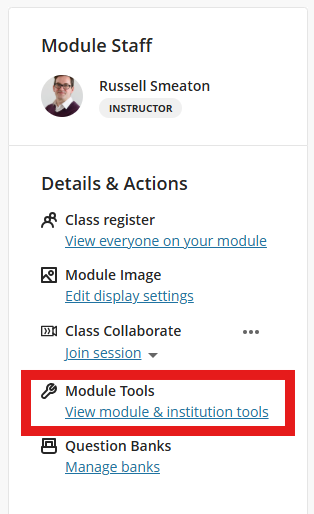
- Over on the right hand side, navigate to the Details and Actions panel. Underneath Module Tools, click where it says View Module & Institutional Tools
- From the side panel that appears, select ReView Video Library

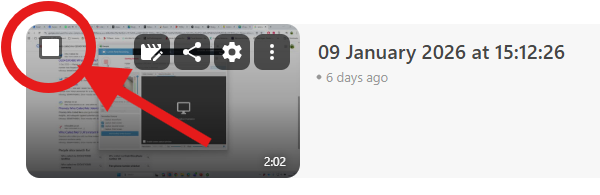
- You can now see all the available videos in the module. Hover your mouse over the video in question, and you’ll notice a small check box appear in the video thumbnail – check this box to select the video.
- You can select multiple videos if you wish to copy over more than one. You’ll also notice at the top of the page a new tool ribbon has appeared. This will let you select all the videos in the module.
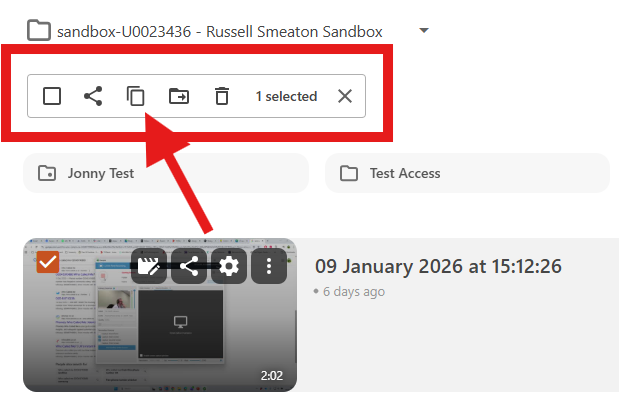
- With the videos selected, from the tool ribbon, click the Copy option (as highlighted in the screen shot above).
- You’ll now be prompted with a pop-up box, asking where to copy the videos to. From the drop down list, select the appropriate module.
- When you select a module to copy to, the orange Copy button will become highlighted. Click this, and the copy process will begin.